Create Wiki/Breakdowns/AI games
Desk photos to a playable kart racer: Gemini 4 Argon, Blender MCP and Three.js
From the OpenDrama Create Wiki
genevieve__h works in developer relations for Google AI Studio, so this is a Google employee demoing Google's own model. She turned photos of her home-office desk into a playable kart racer with Gemini 4 Argon. The keyboard, the desk lamp and a cat figure all became landmarks on the track. The video drew nearly 70,000 views. Her how-to lives in a thread; the steps below are our reconstruction from the 80-second video, not her words. The whole piece rests on one idea: the real objects on the desk are the level.
How it was made
- 01Photosthe desk from several angles
- 02Gemini 4 Argonidentify objects, estimate sizes
- 03Blender MCPmodel to scale, light the room
- 04Three.jskart, laps, HUD
- Most likely it starts with a few photos of the desk and a request for an object list with rough dimensions.
- Argon drives Blender through Blender MCP and builds simplified models: keycaps, lamp, monitor, the cat, all in proportion to the photos.
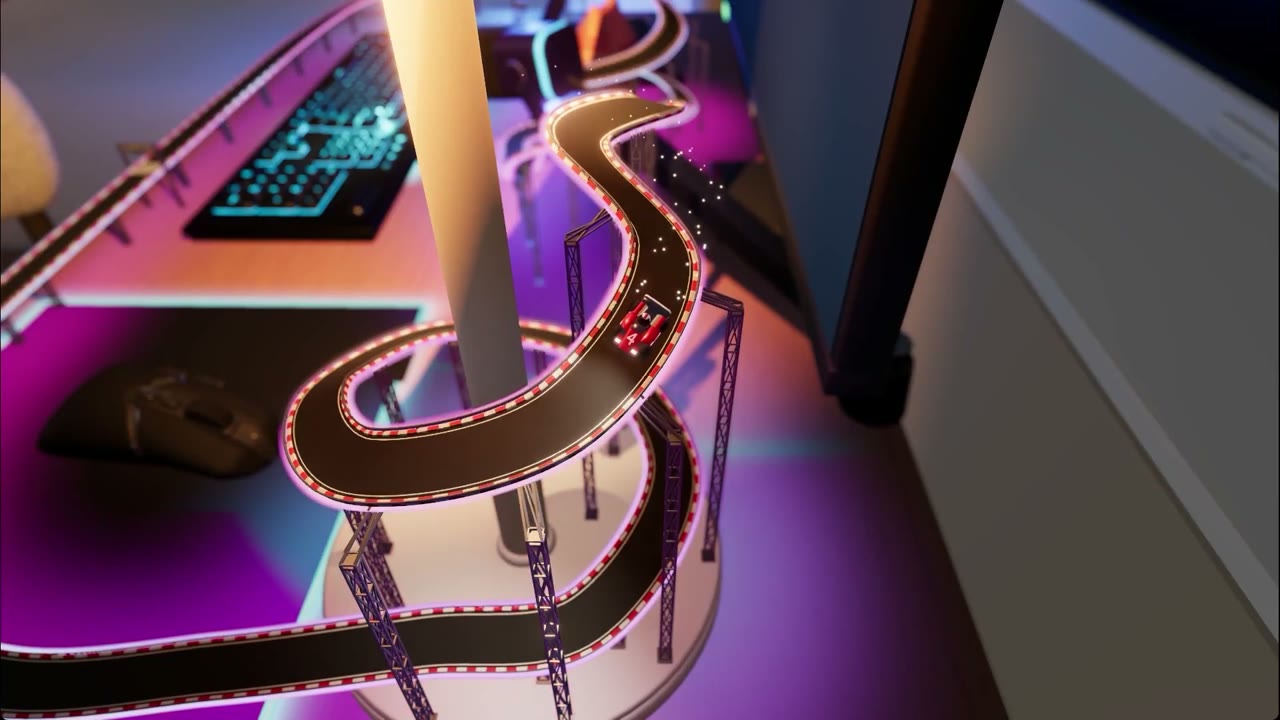
- An elevated track threads between the objects. The truss legs repeat at even intervals, which suggests they were generated along a curve.
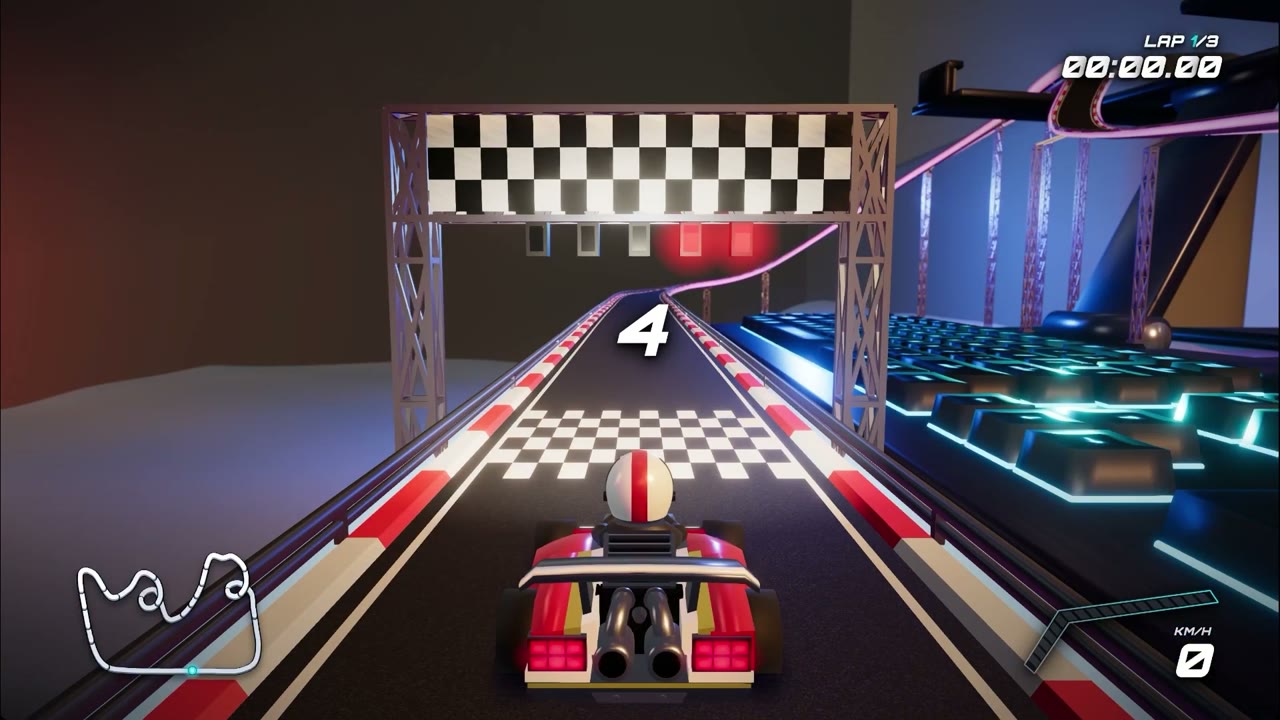
- The scene goes to Three.js for kart handling, a countdown, a 3-lap timer, a minimap and a speedometer.
The details that matter
- Scale contrast is the hook. From the frames, the kart is roughly keycap-sized, so from the chase camera the keyboard looks like a row of buildings.
- One object, one track feature. The track spirals up the lamp pole and loops around the cat. Every object earns a corner or a climb.
- One warm lamp plus neon. The room is dark, the lamp is the key light, and the track edges and the desk glow magenta under bloom.
Where it breaks
- Photos carry no scale. Measure one thing, like the keyboard, and give the model the number, or the proportions drift.
- Karts clip through props or fly off the track. Keep collision meshes separate from the visual ones and put rails on the bends.
Try it yourself
Plan with photo to playable level, hand the modelling to Blender MCP scene building, and borrow the lighting from the Three.js cinematic look[1].
References
- genevieve__h's original post x.com/genevieve__h/status/2110041611455353197
Tags:#Games#Gemini#Blender#Three.js#Level design#HTML5 games
Written by the OpenDrama editors from a public post. Stills are quoted from the original video for commentary; tools, settings and steps are our own reconstruction. All rights in the original work stay with its creator — ask us and we take a still down.
Skills and prompts in this breakdown
More in AI games
View all →An anti-gravity racer in two days: three cups, online lobbies, cars made by players' AI
Stefan rebuilt his childhood favourite, F-Zero X, as the browser racer ZERO-G with AI in two days, and it was played 1,000+ times. Here's the asset pipeline and the design that makes people finish a race.
Day 20 of an AI-built strategy game: a stone golem that wakes up, and a tavern
Stefan is building the strategy game he has wanted for 15 years with AI. Day 20 adds a golem that hides as a pile of rocks and a tavern where you hire fighters. We follow the golem from reference images into Unity.
One person, 16 days, Opus 5.5: The Little Prince as an explorable 3D game
Sac built a planet-by-planet 3D Little Prince with Opus 5.5, Tripo and Blender, playable in the browser. Here's the asset pipeline and how the scenes are organised.
After going viral: how Sky Reach added a Ring world and multiplayer rooms
Tesana says a user's space game, made with a few prompts, went from 2.5M to over 3M views in just over a week. Here's how it added a Ring world and multiplayer without breaking what already worked.
Lyrio: a 3D exploration game built on movement, made with Opus 5.5 and Three.js
A fox-eared scout runs, launches off Wind Springs and glides between floating islands. We break down how the movement set becomes the whole game, and how the collectibles feed it.
Game design brief: a prompt for a playable prototype
A fill-in brief you paste into a coding model at the start of a game: loop, controls, rules, camera, feel numbers, scope cuts and acceptance tests, plus working rules that make it ask questions first, plan milestones and build one verified step at a time.